

Turn 2–10 photos into a collage in seconds
Zuli Collage — Photo Collage Maker
Pick photos, choose a layout, add filters and Zuli Monsters stickers, then save or share. Free on iOS and Android. No account required — everything stays on your device.
2–10 photos · Smart layouts · Filters · 48 Zuli Monsters · English & Hebrew


Everything you need, nothing you don't
Smart layouts
Grids, featured cells, album styles, and shaped slots — filtered automatically for your photo count.
- • 2–10 photos per collage
- • Reorder with long-press drag
- • Per-photo pinch-zoom and pan
- • Undo and draft resume
Canvas shapes
Square, story, portrait, landscape, circle, rounded, heart, and classic 4:3 frames.
- • Story 9:16 for social
- • Gradient or photo backgrounds
- • Spacing and corner radius
- • Polaroid and gold frames
Filters & text
Warm, cool, B&W, fade, bold, vivid, and dim — plus draggable text with Hebrew RTL.
- • One-tap filter presets
- • Multiple text layers
- • Font and color controls
- • Transparent sticker export (Premium)
Zuli Monsters
48 original characters created and owned by Zuki Apps — use them in collages, WhatsApp packs, and iMessage.
- • Built-in sticker tray
- • WhatsApp one-tap install
- • iMessage extension
- • Personal use inside Zuli Collage only
Layout Studio
Draw, resize, and shape numbered slots — save custom layouts for every collage.
- • Drag-and-resize slots
- • Circle, heart, diamond cells
- • Start from templates
- • Named layouts in the picker
Private by design
No sign-in, no cloud upload of your photos. Collages stay on your device until you export.
- • On-device processing
- • Local history (30 collages)
- • English and Hebrew RTL UI
- • Optional one-time Premium
Everything you need, nothing you don't
Smart layouts
Grids, featured cells, album styles, and shaped slots — filtered automatically for your photo count.
- • 2–10 photos per collage
- • Reorder with long-press drag
- • Per-photo pinch-zoom and pan
- • Undo and draft resume
Canvas shapes
Square, story, portrait, landscape, circle, rounded, heart, and classic 4:3 frames.
- • Story 9:16 for social
- • Gradient or photo backgrounds
- • Spacing and corner radius
- • Polaroid and gold frames
Filters & text
Warm, cool, B&W, fade, bold, vivid, and dim — plus draggable text with Hebrew RTL.
- • One-tap filter presets
- • Multiple text layers
- • Font and color controls
- • Transparent sticker export (Premium)
Zuli Monsters
48 original characters created and owned by Zuki Apps — use them in collages, WhatsApp packs, and iMessage.
- • Built-in sticker tray
- • WhatsApp one-tap install
- • iMessage extension
- • Personal use inside Zuli Collage only
Layout Studio
Draw, resize, and shape numbered slots — save custom layouts for every collage.
- • Drag-and-resize slots
- • Circle, heart, diamond cells
- • Start from templates
- • Named layouts in the picker
Private by design
No sign-in, no cloud upload of your photos. Collages stay on your device until you export.
- • On-device processing
- • Local history (30 collages)
- • English and Hebrew RTL UI
- • Optional one-time Premium
See Zuli Collage in action
Real device captures — home, picker, editor, stickers, export, and Layout Studio.
App screens
Beautiful collages in seconds
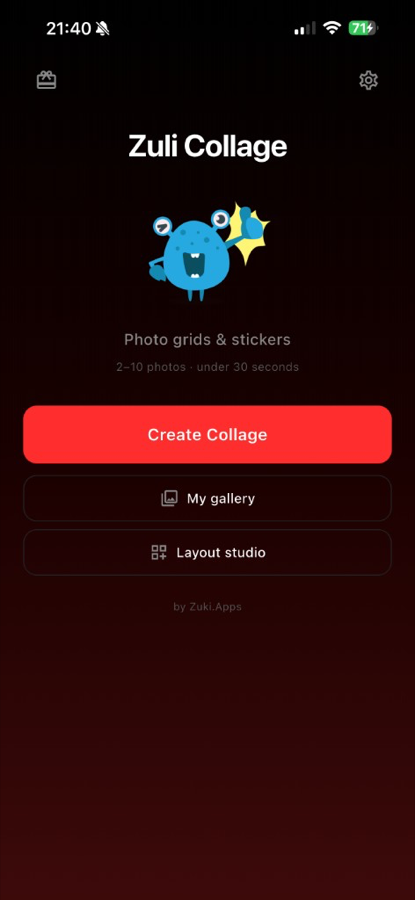
Create Collage, My gallery, Layout Studio, and Zuli Monsters — all from one home screen.
Pick photos & choose a layout
Select 2–10 photos, reorder with long-press drag, and swipe through layouts matched to your count.
Style your collage & add Zuli Monsters
Filters, borders, spacing, and 48 original sticker characters — scale and place them anywhere on the canvas.
48 original sticker characters
Install WhatsApp sticker packs or use the iMessage extension — same characters as in the editor.
Save, share, or send as sticker
Export to Photos, Instagram, WhatsApp, or as a transparent PNG sticker.
Design your own layouts
Drag, resize, and shape numbered slots — save custom layouts for your next collage.
Finished collage output
What Zuli Collage produces — square grids, story formats, filters, and frames ready to share.
How to make a collage
No tutorials needed. Open the app, pick photos, and you're done.
Pick photos
Choose 2–10 images. Long-press and drag to reorder — slot numbers follow your order.
Style it
Swap layouts, pick a canvas shape, apply filters, add text, and drop in Zuli Monsters.
Save or share
Export to your gallery, Instagram, WhatsApp, or as a transparent sticker.
Frequently asked questions
Quick answers about Zuli Collage features, privacy, and Premium.
What is Zuli Collage?+
Zuli Collage is a photo collage maker for iOS and Android. Select 2–10 photos, pick a layout, style with filters and stickers, then save or share — usually in under 30 seconds.
Where can I download Zuli Collage?+
Free on the App Store (https://apps.apple.com/il/app/zuli-collage/id6774583525) and Google Play (https://play.google.com/store/apps/details?id=com.zuki.apps.collagio). Product page: https://zukiapps.com/zuli-collage
Do I need an account?+
No. Zuli Collage works entirely on your device. There is no sign-up, login, or cloud storage of your photos.
How many photos can I use?+
Between 2 and 10 photos per collage. Layouts automatically match your photo count.
What are Zuli Monsters?+
48 original sticker characters created and owned by Zuki Apps. Use them in collages or install packs for WhatsApp and iMessage. Zuli Monsters™, including all character designs, names, and artwork, are the exclusive intellectual property of Zuki Apps. All rights reserved.
What is Layout Studio?+
A tool to design custom collage layouts: drag numbered slots, resize them, pick shapes, name the layout, and reuse it in future collages.
Are my photos uploaded to your servers?+
No. All image processing happens on your device. Photos are never uploaded to Zuki Apps servers.
What does Zuli Collage Premium include?+
Premium is a one-time purchase: no ads, no watermark on exports, high-resolution export, transparent PNG sticker export, and batch save from history.
Which languages are supported?+
English and Hebrew, with full right-to-left (RTL) UI mirroring in Hebrew.
How do I reorder photos?+
On the picker screen, long-press and drag thumbnails. Numbers on the layout preview match photo order (1 = first photo).
Why is there a watermark on exports?+
The free tier adds a small Zuli Collage watermark. Zuli Collage Premium removes it with a one-time purchase.
How do I add Zuli Monsters to WhatsApp?+
From the app home, open Zuli Monsters → Add to WhatsApp → confirm in WhatsApp.
More from Zuki Apps
Explore other free iOS & Android apps from the same developer.


Original characters by Zuki Apps
Zuli Monsters
48 bundled sticker characters you can place on collages or install for WhatsApp and iMessage.
Zuli Monsters™, including all character designs, names, likenesses, sticker artwork, icons, and related assets, are the exclusive intellectual property of Zuki Apps. All rights reserved.
You may use Zuli Monsters only as provided through Zuli Collage for personal collages and messaging. You may not copy, redistribute, sell, sublicense, or create derivative works from these characters outside the app without prior written permission from Zuki Apps.
Available now
Zuli Collage is live on the App Store and Google Play.
Release
1.0.1+3
Stores
App Store (iOS) · Google Play (Android)
Download Zuli Collage
Create beautiful collages with layouts, filters, and Zuli Monsters stickers. Free on iOS and Android.
More from Zuki Apps
Explore other free iOS & Android apps from the same developer.